Summary
Following the retirement of the original iOS app, I built a web version of Building Services Toolbox to address persistent user demand. The revival brings the two most-used tools (pipe sizer and duct sizer) to the web with cross-platform accessibility whilst maintaining the transparency and simplicity that made the original successful.
The web application is live at bsetoolbox.com, providing engineers with immediate access to core sizing calculations without platform restrictions. This project addresses persistent user demand whilst also gauging interest before committing to full feature parity with the iOS version.
User Demand for Revival
Once the iOS app became incompatible with newer iOS versions and was removed from the App Store, I received numerous messages from engineers asking whether it would return. The consistency and tone of these messages made it clear there was genuine demand for the tools.
"This might sound odd, but I am a huge fan of your iconic BSE toolbox app, and I used it pretty much daily! Unfortunately I updated my iPhone and your app was a casualty and it won't reload as it's no longer on the App Store. Is there any easy way to bring it back??"
"I am a big fan of your BSE app. I've had to part ways with it a few years ago when I transitioned to an Android. But yeah. Wanted to say great work and was wondering if it was going to make a comeback."
These messages revealed two key insights. First, engineers genuinely found the tool valuable in their daily work. Second, the iOS-only limitation had excluded a significant portion of the target audience. Building services engineers work across Windows desktops, Android phones, iPads, and everything in between. An iOS-only tool was inherently limited, regardless of how useful the calculations were.
Why a Web Platform
A mobile-first web application addresses the platform limitation whilst aligning with the skills I use in my day-to-day work. I don't actively develop mobile applications anymore, but I work with web applications extensively. Building a web version meant leveraging existing expertise rather than returning to mobile development.
More importantly, a web application is universally accessible. Engineers can use the tools on their Windows laptop at the office, their Android phone on site, or their iPad in meetings. The platform doesn't matter. As long as there's a browser, the tools work.
Beyond accessibility, the web platform eliminates the maintenance burden that eventually killed the iOS version:
- No gatekeeping: No App Store submission process, no iOS version compatibility issues, no review delays. Updates deploy instantly to all users.
- Instant access: Engineers can use the tools immediately via URL without downloading or installing anything. Share a link and it works.
- Sustainable for a side project: As a solo developer maintaining this for free, the web platform significantly reduces ongoing effort. No annual iOS SDK updates, no device compatibility testing, no App Store renewals.
The web platform meant I could revive the core functionality without the operational burden that eventually made the iOS version unsustainable. It's a better model for a free engineering tool.
Technical Implementation
I built the web application using Next.js 14 and deployed it on Vercel. This was an easy decision. Next.js has a fantastic developer experience, and for projects like this, it's straightforward for a single developer to manage. React is my JavaScript framework of choice, so using it was natural.
For styling and components, I used shadcn/ui with Tailwind CSS. I particularly like shadcn's approach of having you own the components within your codebase rather than depending on an external package. This gives full control over the implementation whilst providing well-designed starting points. TypeScript throughout ensures type safety across the application.
The application is entirely static with no data fetching required. All calculations run client-side in the browser, and the entire site can be statically generated at build time. This keeps the architecture simple, hosting costs minimal, and performance excellent. There's no database, no API server, no backend complexity. Just static files served from a CDN.
Maintaining the Core Philosophy
The fundamental approach that made the original app successful remains unchanged: transparency, simplicity, and immediate utility. The web version preserves these principles whilst adapting to the different interaction patterns of web applications.
Engineers can see exactly what's happening with their calculations. Default parameters are sensible, but everything is configurable. The interface is deliberately simple: pick your tool, enter your parameters, get your results. No accounts, no subscriptions, no unnecessary complexity.
Features
The web version currently provides the two most frequently used tools from the original iOS app: pipe sizer and duct sizer. These represent the calculations engineers needed most often based on usage data and feedback.
Pipe Sizer
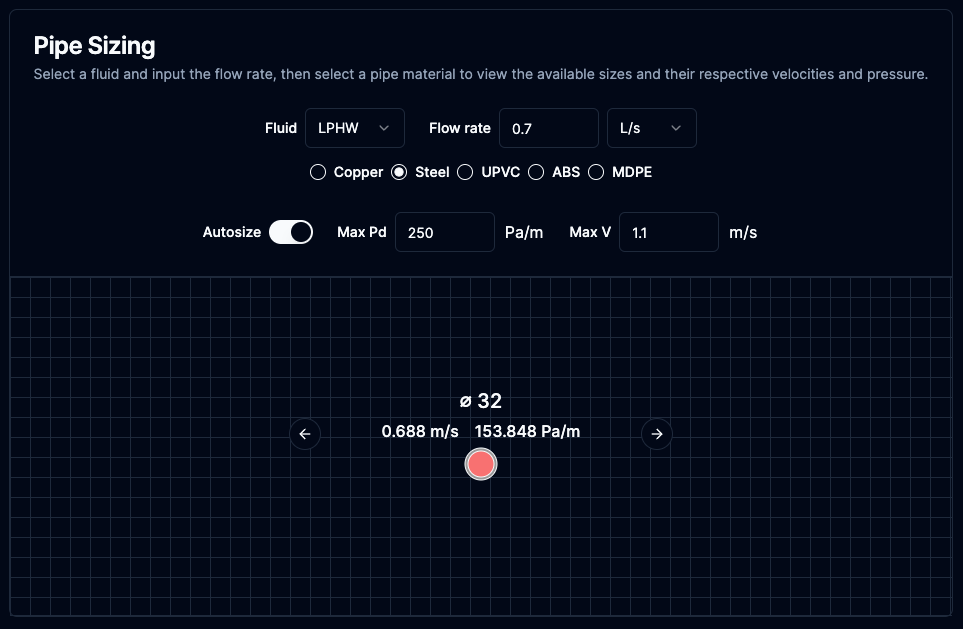
The pipe sizer maintains the same transparent approach as the iOS version, allowing engineers to size heating and chilled water pipes based on flow rate with visual feedback.
Available at bsetoolbox.com/pipe-sizer
Video Demonstration
Duct Sizer
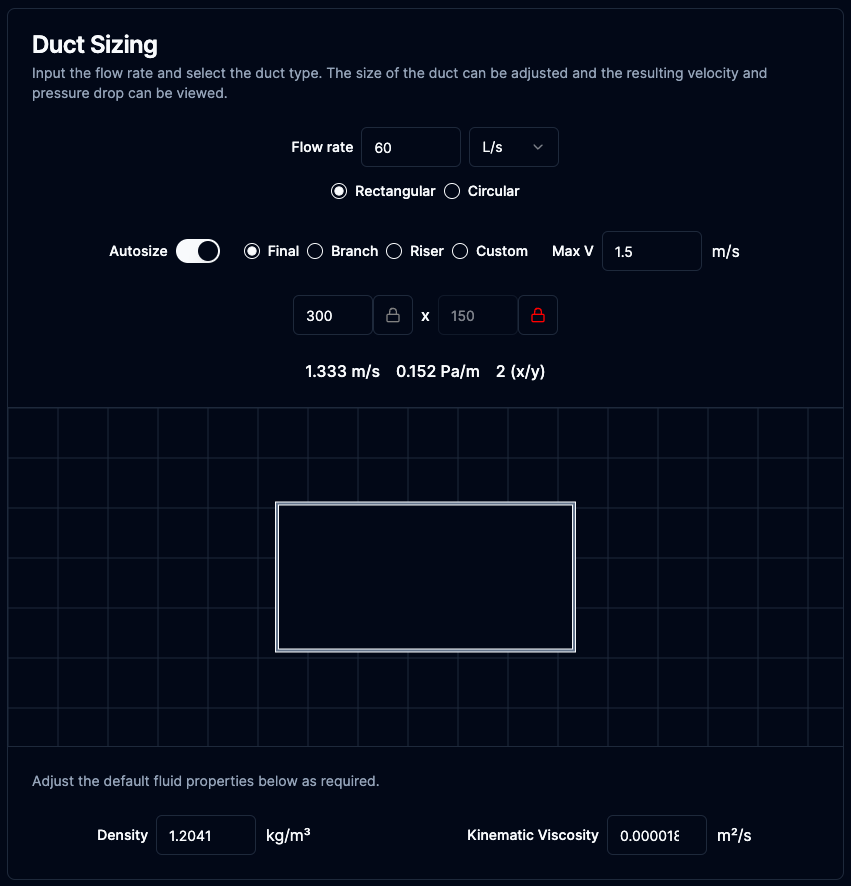
The duct sizer provides both circular and rectangular duct sizing with visual feedback and automatic sizing based on velocity constraints.
Available at bsetoolbox.com/duct-sizer
Video Demonstration
Visual Scale Representation
The visual feedback system for pipes and ducts required careful consideration. Representing different pipe and duct sizes with accurate relative scaling whilst keeping the interface usable involved significant mathematical work.
The grid background needed to scale appropriately as sizes changed, providing immediate visual feedback on the relative difference between a 50mm pipe and a 150mm pipe, or a 300x200mm duct versus a 600x400mm duct. The solution involved dynamic SVG rendering with responsive scaling calculations that adjust based on viewport size and selected dimensions.
The key technique for conveying scale changes was varying the grid density in the background. This is particularly effective when users manually resize, cycling through available pipe sizes or adjusting duct dimensions. These can't be drawn to true scale on screen, of course. Even when the pixel size of the shape shrinks, the changing grid density creates the perception of bigger or smaller as users transition between sizes. Larger sizes get denser grids (smaller squares), smaller sizes get less dense grids (larger squares). This gives users an immediate sense of whether they're looking at a small branch pipe or a large distribution main without reading the dimensions.
The result works well. Engineers can immediately see the relative scale of what they're working with, which helps catch obvious sizing errors before they happen.
Current Status
The web version is live at bsetoolbox.com with the two most-used tools from the original iOS app: pipe sizer and duct sizer. Both tools maintain the transparent calculation approach and visual feedback that made the original successful, whilst working across any device with a browser.
Additional calculations from the iOS version (simultaneous demand for domestic water, multiple heating loads, daylight assessments) could be added in future, depending on user feedback and available time. The landing page includes a call-to-action for engineers to get in touch if they find the tools useful, which helps gauge genuine interest.
Reflections
I built this web revival in 2024 partly to gauge interest, but also because I felt some responsibility to the users who had relied on the original iOS app for years. Engineers had come to depend on these tools in their daily work, and when the iOS version became incompatible, they lost access to something genuinely useful. I wanted to provide them with something, even if it wasn't as feature-rich as the original. The two core tools (pipe sizer and duct sizer) represented what engineers used most frequently. Getting those working on the web felt like the right minimum to offer.
Since launching, usage hasn't been significant enough to justify substantial further development yet. That's fine. One of the most important lessons from running side projects over the years is knowing when to say no, even to things that genuinely interest you.
The web platform approach has already proven more sustainable than the iOS version. No App Store gatekeeping, no annual SDK updates, no device compatibility testing. Updates deploy instantly. For a free side project maintained by a solo developer, this operational simplicity matters enormously. The proof-of-concept strategy makes sense: validate demand before committing to full feature parity.
I'd enjoy building out the remaining features. The technical work is interesting, and I know the domain well enough that implementation would be straightforward. But time is finite, particularly as a father of two young children. Free hours available for side projects have become increasingly scarce, and the hours I do have need to be allocated deliberately. Expanding this app further would mean not doing something else, and right now, other priorities matter more.
That said, the rise of AI coding tools may change this equation. The speed at which I can build features has increased dramatically with AI assistance. What might have taken weekends of focused work a few years ago can now be accomplished in hours.
For now, the two core tools are live and available. If usage picks up organically or if AI tooling makes expansion significantly more efficient, I'll reconsider. Stay tuned.