Summary
Pocket Papers was a mobile app that provided offline access to Irish state exam materials. I built it as a solo developer whilst early in my software development journey, grew it to over 100,000 downloads across iOS and Android, and sold it to an education-focused business in 2021.
The project demonstrated end-to-end product development: identifying a genuine user problem, validating market size through research, building native mobile applications, developing custom content pipeline automation, and scaling to serve tens of thousands of active users. I handled everything from initial market analysis to customer support, maintaining the platform single-handedly whilst working a full-time job.
The technical stack included Swift for iOS, Java for Android, a LAMP stack for content delivery, and custom Visual Basic automation for processing over 9,000 documents across 83 subjects. The offline-first architecture and file compression techniques were critical for students with limited data connectivity. The app achieved a 4.9/5 rating across 1,000+ reviews and was featured in national media during exam seasons.
Identifying the Problem
In 2015, Irish students preparing for state exams (Junior Certificate and Leaving Certificate) had access to decades of past exam papers via the State Examinations Commission website. This was valuable for revision, but the user experience was terrible.
The website used a series of cascading dropdown menus to navigate to documents. You'd select the year, then the exam, then the subject, then the level, then finally the type of document (exam paper or marking scheme). Here's the nightmare: if you wanted to switch from the 2014 Maths paper to the 2013 Maths paper, changing the year in the first dropdown would reset everything. You'd have to go back and re-select the exam, re-select the subject, re-select the level, re-select the document type. Every single time.
The bigger problem was that the website wasn't designed for mobile use at all. Some students had laptops, but pretty much every student had a smartphone. often provided tablets rather than laptops. Whatever solution was used needed to be mobile-first. Students also wanted to study whilst commuting, in study halls, or in areas with dodgy Wi-Fi, which was particularly common back in 2015. Offline access wasn't just convenient, it was essential.
The scale of the problem was substantial. Across both the Junior Certificate and Leaving Certificate, spanning years 2000 to 2019, there were thousands of documents: exam papers, marking schemes, aural examinations with accompanying sound files, and supporting materials like maps and diagrams. All of this existed in both English and Irish, adding another layer of complexity to content organisation.
I was very early in my software development journey. I wasn't yet a professional developer, and this was my first serious software project. The best way to learn is by building, and this was a perfect opportunity to do so. The technical solution seemed clear: provide the papers in a mobile-first app with offline access, fast loading, and a clean interface. Make exam revision genuinely portable. My ignorance and naivety was really a superpower.
Understanding the Market
Before writing any code, I needed to understand the scope of the problem. How many students were taking these exams? Which subjects had the highest enrollment? The State Examinations Commission published annual statistics that answered these questions precisely.
Data-Driven Prioritisation
Before building anything, I analysed State Examinations Commission data from 2013–2014 to understand the potential user base. With approximately 60,000 students sitting the Leaving Certificate annually, the top six subjects represented the clearest opportunity. This guided the initial scope: focus on high-volume subjects first, then expand based on demand.
Content Management and Automation
The first challenge was content. The State Examinations Commission website had thousands of documents scattered across multiple pages. I needed a system to collect these papers, organise them properly, and make them available to mobile apps in a structured format.
I started with the largest subjects first: Maths, English, and Irish. These had the highest enrollment numbers, so delivering value here would reach the most students. Over time, I expanded coverage to include all available subjects, eventually managing documents across both Junior and Leaving Certificate exams.
The content pipeline had to handle five distinct file types, each with different characteristics:
- Exam Papers: The actual papers handed to students on exam day
- Marking Schemes: Guidance documents containing solutions and marking criteria
- Aurals: Listening comprehension papers for language subjects
- Sound Files: Audio recordings that accompany aural examinations
- Supporting Documents: Subject-specific materials like maps for Geography, diagrams, or aerial photographs
The scale grew significantly. By the time I'd expanded coverage to all subjects across both exams (including Higher, Ordinary, and Foundation levels), the system managed over 9,000 files:
Comprehensive coverage across all subjects, multiple levels (Higher, Ordinary, Foundation), spanning 2000–2019, available in both English and Irish
This content spanned 27 subjects for the Junior Certificate and 56 subjects for the Leaving Certificate. Coverage wasn't limited to the core subjects like Maths, English, and Irish. The app included everything from Ancient Greek and Hebrew Studies to modern languages like Polish and Lithuanian, reflecting Ireland's EU membership and diverse student population. Even niche subjects like Agricultural Economics, Classical Studies and Technology were fully supported.
Adding complexity, all documentation was available in both English and Irish. The app included a language preference setting that respected user choice. If a student set their preference to Irish, the app would download the Irish version when available, falling back to English versions for documents that hadn't been translated. This required careful metadata management and fallback logic throughout the apps.
I built a custom content pipeline that ran locally on my laptop, centred around a macro-enabled Excel spreadsheet. I chose Visual Basic because I had experience with VBA macros from my time as an engineer and it integrated perfectly with Excel for managing the complex metadata involved (yes, I was using Excel as a database!).
The pipeline started with scripts that scraped the State Examinations Commission website for available documents. These scripts had intelligence built in to automatically collate content based on metadata extracted during scraping. The spreadsheet would organise everything across multiple tabs, dividing files by type and grouping related documents together: exam papers with their corresponding marking schemes, aural papers with their sound files, all arranged by year and level.
File processing was crucial for mobile performance. Sound files went through a compression step that lowered the bit rate significantly, massively reducing file size whilst maintaining perfectly adequate audio quality for listening comprehension. PDFs were also compressed to minimise download sizes. After processing, there was a QA stage combining automatic validation and manual checks to ensure quality before deployment.
Once I was satisfied with the content, additional scripts would upload the processed files from my laptop to my server and update the MySQL database with the new metadata. A LAMP stack (Linux, Apache, MySQL, PHP) on the server exposed this metadata through API endpoints and served the files to mobile apps.
Despite the automation, this remained a tedious and time-consuming process given the scale of documents involved. I had to run through the entire pipeline yearly when the State Examinations Commission released documentation for the previous year's exams, whenever new subjects were added, or any time the content on their website changed. The automation tools improved over time as I fine-tuned the workflow and gained experience with edge cases. The system was unconventional but reliable, and I could maintain it single-handedly whilst working a full-time job.
Building for iOS and Android
I started with iOS because that's where I had development experience. The app was built in Swift with a focus on speed and simplicity. On first launch, the app queried the server for all available content metadata and created a local SQLite database on the device. Users could browse the full catalogue and download files on demand when they selected specific papers. The app checked for database updates on launch using a simple version mechanism, syncing automatically when new content was available. Once files were downloaded, the app worked completely offline. The interface was minimal: pick your subject, pick the year, view the paper. No clutter, no unnecessary features.
Demand for an Android version was clear from user feedback, so I taught myself Java and built an equivalent Android app. Same principles: fast, offline-first, no nonsense. The Android version proved just as popular, extending reach to students who couldn't access the iOS ecosystem.
Growth and User Engagement
Pocket Papers grew organically through genuine utility. Students needed it, it solved their problem better than any alternative, and they told their friends. Teachers started recommending it. The App Store reviews were overwhelmingly positive. Just a useful tool that people actually wanted to use.
Whilst word of mouth was driving growth, I wasn't sitting back passively. In those early days, I printed marketing flyers and personally delivered them to schools across my local area. The flyer showcased the core value proposition simply: "Exam Papers, Marking Schemes, Hand Outs, Sound Files - All in Your Pocket!" alongside screenshots of the iOS app.
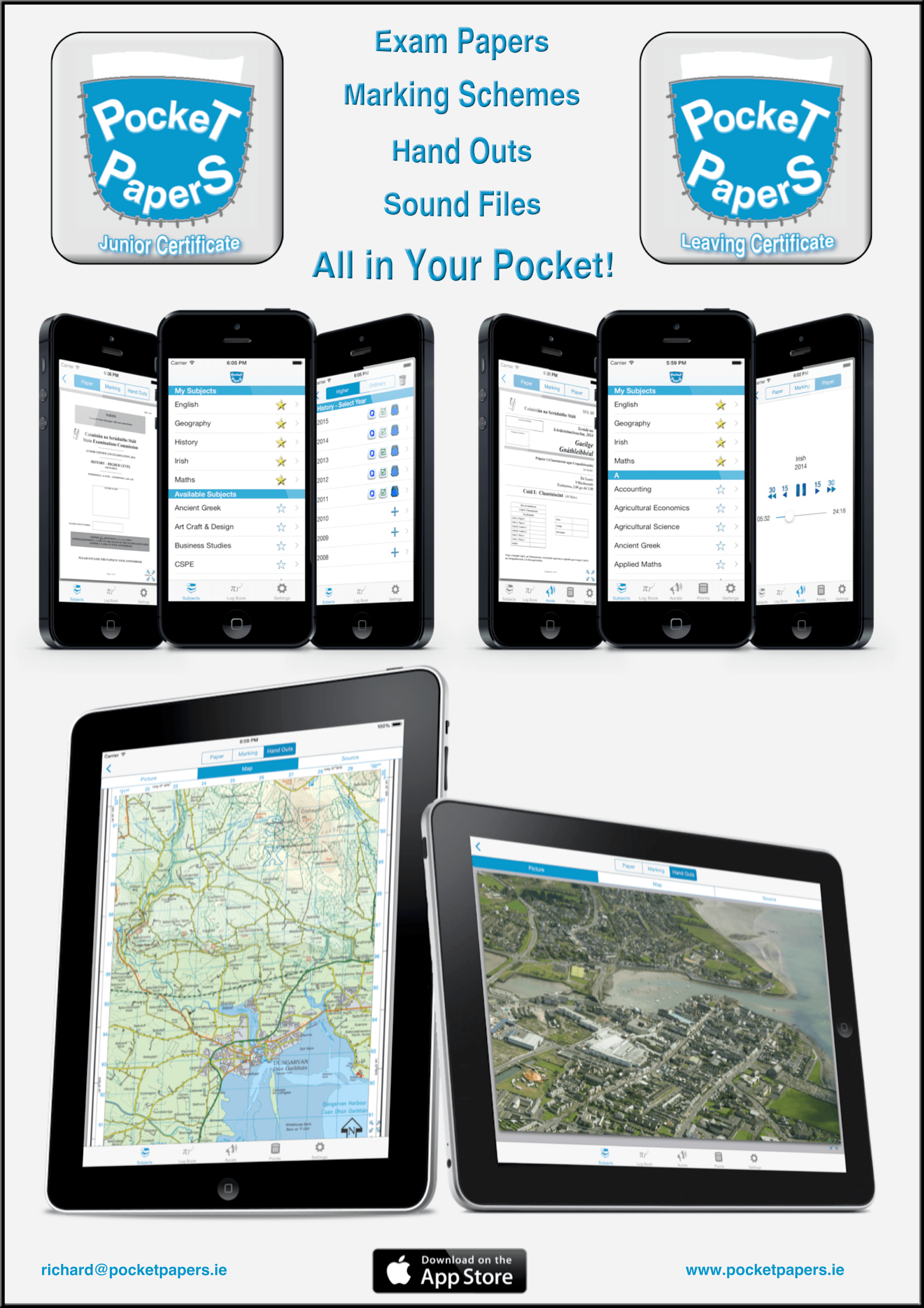
Marketing flyer from 2015, personally delivered to local schools during the iOS-only period
By 2018, the app had crossed 100,000 downloads across iOS and Android. Five-star reviews were the norm across more than 1,000 ratings on both the App Store and Play Store. The app was featured in national media during exam season. Parents recommended it to their children.
What struck me most was the impact relative to the effort. The core functionality was straightforward, but because it genuinely solved a real pain point for thousands of students every year, the value was disproportionate to the technical complexity.
Support and Community
Running a consumer app used by teenagers during one of the most stressful periods of their lives came with unique support challenges. Emails ranged from genuine bug reports to panicked messages about missing papers (usually user error) to requests for specific subjects that hadn't been digitised yet.
I handled support personally, responding to every email. During peak exam seasons (May-June), this could be time-consuming, but it also provided invaluable feedback. Students told me exactly what worked, what didn't, and what features would make the app more useful.
This direct connection to users shaped product decisions. When students requested marking schemes alongside papers, I added them. When they asked for better search functionality, I built it. The app evolved based on real usage patterns, not assumptions about what students might want.
What Users Said
Over six years, thousands of students and teachers shared their experiences with Pocket Papers. Here's what they had to say.
Excellent APP
I'm a secondary teacher of Irish for the past 14 years in Kerry. This is an truly outstanding app - I immediately upgraded to premium.
Amazing app!
This app helped me get 625 in my Leaving Cert 2018 and is for free unlike StudyClix! 👺
Leaving Cert Must Have!
This might just be the best thing any leaving Cert student can have, the fact you get all the marking schemes easily, really outshines any of the websites. The log tables book on your phone might actually be one of the smartest things I’ve ever seen to date. Last but not least the CAO course finder and points calculator makes searching for courses so much easier. I honestly think this App is a MUST HAVE runs very smoothly is very helpful and honestly the only complaint is the ads but which app doesn’t have ads now a days!
Great revision tool
Thank you for the awesome, great app and thanks for adding 2018 papers...been using this app since 5th yr and I totally recommend it to my friends, nice interface with more convenience than studyclix or examinations.ie and I like the subjects that can be categorised by topics, though I wish those could be updated for the newer years. Overall keep up the good work!!
Wow
Absolutely brilliant no hassle , no bull crap , everything you need in your pocket, no need for buying papers and saves so much time. Sweet. I’ll miss this app
Absolutely ideal
Honestly the BEST app to use for a leaving very student it has everything you could need and makes studying so so easy!
the SEC could never
sooo convenient and fast. Much easier to navigated than the SEC website.
Very useful
Great app, my students have found it very quick and easy to access exams and questions
Excellent
I downloaded this app to make myself feel less stress knowing it was on my phone but not using it. Now the my mocks exams are happening I decided to see what the app was like. It is a brilliant app with everything the stressed out leaving cert student needs right at their fingertips! I would highly recommend the app ! (Only thing one might see as a problem are the pop up ads but I don’t care about those) All in all an excellent application !
Brilliant
Must have for leaving cert students. Much easier than examinations.ie
Really helpful
Really helpful to have all of my school related things in the one place. I can revise with the multiple choice questions, get access to past papers, aural files for my languages and work out my points all in the one place. Best app for help with my LC. Thanks
Great App
Absolutely brilliant resource for Leaving Cert! Every student should have it!
Analytics and Usage
I instrumented the app with Firebase Analytics to understand usage patterns. This gave me visibility into which screens students were viewing, what devices they were using, when they were studying, and where in the world they were accessing the app.
One of my favourite moments was logging into the Firebase console and seeing a map of Ireland lit up with clusters of activity across the country. Seeing real-time usage from Cork to Donegal, from Galway to Dublin, made the impact tangible in a way download numbers never could.
What surprised me most was discovering users in unexpected places: South Africa, Australia, the United States. These were Irish students studying for the Leaving Certificate through alternative pathways. The app had reached further than I'd ever anticipated.
Unfortunately, I no longer have access to the Firebase platform and never took screenshots of those dashboards. What I do have is a record of bandwidth usage from my server, which serves as a proxy for app usage through file download patterns. I also relied on the built-in App Store and Play Store analytics for download and retention metrics.
Usage Patterns
Server bandwidth served as a proxy for app usage. Because Pocket Papers was offline-first, students downloaded papers once and accessed them locally thereafter. The data reveals clear seasonal patterns aligned with exam cycles: January and February spikes correspond to mock examinations, whilst June shows the largest peaks as students prepared for the actual exams. The academic year begins in September, and the data tells an amusing story: some diligent students downloaded materials early in the year, whilst others waited until the week before exams to start their "revision".
Beyond the timing patterns, the data revealed that subject usage reflected the market analysis from earlier. Core subjects like English, Maths, and Irish saw significantly higher usage, whilst niche subjects had fewer views, matching the enrollment statistics. The majority of users were repeat visitors during their exam preparation, suggesting the app genuinely became part of their revision routine. However, there was natural churn once students finished their exams. They'd either stop using the app or delete it entirely, wanting nothing more to do with exam papers. This was entirely expected (and understandable) behaviour.
The best way to understand how the app was being used wasn't through dashboards or metrics. It was through direct conversations with students and teachers, which I made a point of having frequently. Those conversations revealed insights no analytics platform could provide: which features genuinely helped with revision, what pain points remained, and what mattered most during the stressful exam period.
This experience was formative for understanding product metrics, user retention, and data-driven decision-making. It was my first time building something with a large user base, and the lessons about what metrics actually matter (versus vanity metrics) have stayed with me.
Acquisition and Handover
In 2021, I was approached by an education-focused business interested in acquiring Pocket Papers. By this point, I was deep into full-time software engineering at CoolPlanet, and whilst I'd maintained the app, I hadn't been able to invest in significant new features.
The acquirer had resources to expand the platform, add new features, and integrate with their broader education offerings. The fit made sense. After negotiations, we completed the acquisition.
I'm proud of what Pocket Papers achieved. It demonstrated that thoughtful, user-focused software can have real impact even without massive budgets or teams. A substantial proportion of Irish students used the app during their exam years. That's rewarding in a way that's hard to quantify.
Reflections
Building and running Pocket Papers taught me things I still keep in the back of my mind as a staff engineer:
- Pragmatism beats perfection: I managed metadata in Excel with VBA scripts. Today, if someone told me they were using Excel as a database, I'd squirm. But my naivety was a superpower. I shipped something that worked without getting stuck chasing the "perfect" architecture. Simple solutions that you can maintain beat technically impressive ones that become a burden.
- Control your critical dependencies: I initially had the app download files directly from the SEC website. When their site went down, my app broke. I learned the hard way that you can't build on foundations you don't control. I moved to self-hosting all content, which meant operational complexity but complete reliability.
- Focus on the core: I built a course finder feature to help students discover third-level programmes. It required scraping data from every Irish university and institute, wasn't core functionality, and became a maintenance nightmare. I should have killed it earlier. Focus matters more than breadth.
- Keep it simple (stupid): The offline-first architecture meant I didn't worry about server uptime during exam season. Simple technology choices (LAMP stack, VBA scripts) meant I could maintain everything single-handedly whilst working full-time. In later years, it was just one big job each summer when new content was released, then coasting the rest of the year.
- Clean code doesn't equal valuable product: I was learning to code whilst building this. The codebase didn't follow best practices. Yet it became one of the most valuable things I've created. Solving real user problems matters infinitely more than architectural purity.
- Monetisation experiments often backfire: I tried premium tiers (pay for certain subjects or years), which just frustrated users. I experimented with ads, which worked technically but interrupted students whilst studying. The monetary payout wasn't worth the user frustration. Sometimes the best monetisation is building something people genuinely value.
- Design for the user lifecycle: Students naturally churned after finishing exams. They deleted the app and wanted nothing more to do with exam papers. Fighting this would have been futile. Instead, I made the experience good enough that they recommended it to younger siblings and friends. Word of mouth mattered more than retention metrics.